Icon Anchor
A downloadable tool for Windows
Keep your desktop icons where you want them.
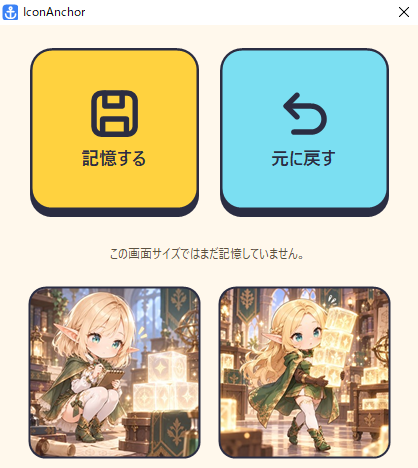
Icon Anchor is a small Windows utility that remembers your desktop icon layout and restores it when things get shuffled around. Two buttons, one portable executable.
Features
- Save your current icon positions and restore them with a click.
- Separate layout files for each screen resolution.
- New icons are placed in available grid spaces; missing icons are ignored.
- No installation or administrator privileges required. No registry use.
- Japanese interface: 記憶する = Save layout; 元に戻す = Restore layout.
How to use
- Download IconAnchor.exe and place it in a folder of your choice.
- Turn off Windows desktop “Auto arrange icons” (right-click the desktop → View).
- Launch IconAnchor.exe and click 記憶する to save your layout.
- If the icons move, click 元に戻す to restore the saved layout.
Windows 7 or later, 32-bit or 64-bit. Requires .NET Framework 4.0 or later.
Layout data & notes
Layouts are stored as text files beside the executable, with a separate file for each screen resolution. If that folder is not writable, they are saved in %LOCALAPPDATA%\IconAnchor. The save location is shown in the app.
Layout files contain desktop item names; keep them private. The executable is unsigned, so Windows may display a warning on first launch.
License & source
MIT License. Source code and documentation: GitHub.
Free to download. Tips are welcome if you find it useful!
デスクトップのアイコン配置を、いつもの場所へ。
Icon Anchorは、デスクトップのアイコン配置を記憶して、崩れたときに戻すWindows用の小さなツールです。ボタンは2つ。インストール不要で、exe 1個で動きます。
主な機能
- 現在のアイコン位置を記憶し、クリックで復元
- 画面の解像度ごとに配置を別々に保存
- 記憶にない新しいアイコンは空いているマスに配置。削除済みのアイコンは無視
- インストール・管理者権限は不要。レジストリは使用しません
- 日本語UI。「記憶する」「元に戻す」の2ボタンで操作
使い方
- IconAnchor.exeをダウンロードし、好きなフォルダに置きます。
- デスクトップを右クリック →「表示」→「アイコンの自動整列」のチェックを外します。
- IconAnchor.exeを起動し、「記憶する」で現在の配置を保存します。
- 配置が崩れたら「元に戻す」で保存した位置に戻します。
Windows 7以降、32bit / 64bit対応。.NET Framework 4.0以上が必要です。
保存データ・注意事項
配置はexeと同じフォルダに、解像度ごとのテキストファイルとして保存されます。書き込みできない場合は %LOCALAPPDATA%\IconAnchor に保存されます。保存先はアプリ内に表示されます。
配置ファイルにはデスクトップ上のファイル名が含まれるため、公開・共有しないでください。exeはデジタル署名がないため、初回起動時にWindowsの警告が出る場合があります。
ライセンス・ソースコード
MITライセンスで公開しています。ソースコードと詳しい使い方は GitHub をご覧ください。
無料でダウンロードできます。役に立ったら、投げ銭で応援してもらえると嬉しいです。
Download
Click download now to get access to the following files:
Leave a comment
Log in with itch.io to leave a comment.